Lecture video: beta acceptance tests
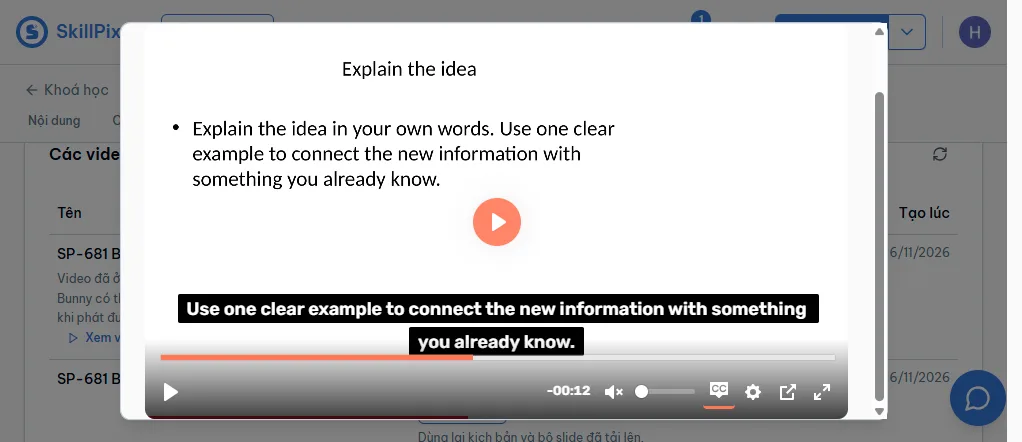
A new lecture video reached Bunny and played with English captions. Admin model saves, resets and stale-write rejection also passed.
SP-679 | Live tests: 16 November 2026 | Report: 17 November 2026
Status as of 17 November 2026
Core beta flow passed. Full acceptance remains incomplete. Transcript persistence, direct invalid-ID API writes, saved-model retry checks and live provider faults still need verification.
These screenshots and this generated video come from the real beta LMS, using a synthetic three-scene lesson in an isolated QA course. This is not a local mock demonstration.
PR #622, merged | Successful staging admin deployment | Jira SP-679
Why these checks matter
The admin and runner were blocked before reaching backend authentication. After the authorized Cloudflare configuration change and beta routing updates, the admin could manage model choices and the runner could complete a fresh generation. Delivery, captions and playback were checked separately.
Upload
Synthetic XLSX and three-slide PPTX.
Review
English detected. Instructor confirmed US English.
Generate
Six speech beats and a new Bunny delivery.
Play
22.87 seconds, captions and seeking checked.
The new generated video
This is the 480p stream exported from the newly delivered Bunny video. It contains the generated narration. It is output evidence, not a recording of the complete UI test session.
Live player proof
Acceptance checks and results
Live observations, local automated checks and unverified cases are listed separately.
| Check | Result | Evidence and scope |
|---|---|---|
| Admin access | Live pass | Config loads through the Cloudflare beta route. |
| Catalog default and choices | Live pass | Opus 5.5 is the default. The editor offers the two approved exact IDs. |
| Global save and reset | Live pass | Saved Opus 5, saw the global override, then reset to Opus 5.5. |
| Tenant override and reset | Live pass | Saved a tenant override. Reset preview showed the inherited model. The tenant returned to Default / Opus 5.5. |
| Stale editor | Live pass | A second tab saved a newer revision. The older tab was rejected with HTTP 409. |
| Anonymous and invalid sessions | Live pass | Both direct staging-admin catalog probes returned HTTP 401. |
| Upload, profile and language review | Live pass | Three-scene XLSX/PPTX accepted. English detected. The job waited for instructor confirmation before audio. |
| New Bunny upload | Live pass | New job delivered successfully. The resumed Cloud Run execution completed in 93 seconds. |
| New captions | Live pass | English WebVTT has six cues matching the synthetic script. The instructor list reports captions attached. |
| Playback and seeking | Live pass | Chrome played to the end of the 22.87-second video. Seeking changed the slide and displayed the matching English caption. |
| Reloaded delivery state | Live pass | Delivered and captions-attached state remained after a full page reload. |
| Failed script profiling | Live pass | A one-scene negative fixture failed the minimum-scene self-check after four bounded attempts. The UI showed failure and retry; the course slot was released. |
| Transcript database persistence | Not verified | The direct beta transcript read was not completed. A saved caption track alone is not independent proof of the transcript database row. |
| Provider denial, retirement and outage | Automated pass | Five focused runner tests cover contract validation, legacy evidence, model redirection/retirement, credential denial, retry bounds and deadline expiry. Provider responses are mocked. |
| Backend model contracts | Automated pass | 25 backend unit tests passed. These are local tests, not live beta fault injection. |
| Invalid model IDs through live API | Not verified | The live dropdown restricts choices. Direct authenticated invalid-ID submissions were not completed. |
| Saved model through edits/retries | Not verified live | The current report does not claim a live inspection of the saved job model or a retry after a configuration edit. |
| Production generation | Not run | No production render or production admin backend change was made. |
Repeat the remaining tests
- Open the QA course and inspect the new video's transcript through the beta application API or transcript editor. Confirm language, origin, segment count and persistence after reload.
- Use authenticated admin API requests to submit unsupported IDs, wrong case, whitespace and aliases. Expect rejection with the saved setting unchanged.
- Confirm a job, change the tenant model, and verify that the original job and its retry retain the original saved model. Start a new job to check the new effective model.
- Run isolated provider-failure tests without changing credentials for other beta users. Verify that failed preflight starts no speech or rendering.
Known limits and follow-up
- The native computer-use connection failed on 17 November. Chrome DevTools auto-connect still timed out after the user approved access. The direct transcript read and additional live fault cases remain unverified.
- The beta dispatcher callback mapping was repaired manually. The deployment workflow still contains the direct DigitalOcean beta URL. A later runner deploy can overwrite the working mapping. Make the Cloudflare beta hostname permanent in CD before relying on the next deployment.
- Bot Fight Mode is off across the shared skillpixel.vn zone, as explicitly authorized. No other bot configuration changed. This zone setting also affects production traffic.
- Temporary global and tenant model overrides were removed during the live session. Both returned to Default / claude-opus-5-5. No later model write was made.
- One-scene profiling failed before audio. The valid three-scene input passed after a repair. Those are two distinct test jobs.
- Zero pending usage events proves acknowledgments, not invoice or database-ledger reconciliation.
Evidence records
Successful job: TozDf_OA-KwLbo_wRoWpg. Video: c5622021-803e-4a6d-ba43-903bfb3a9e4a. Final execution: lecture-video-runner-beta-4sdr6.
The exported MP4 fully decoded without errors. It is 1,661,875 bytes, 854 x 480, H.264/AAC. The English VTT is 568 bytes with six cues.
Download generated video | Download English captions | Structured results
How to use the feature
- In staging admin, open Config and search for lecture. The model editor offers the approved choices and shows the source of the effective value.
- For a tenant override, open Tenant overrides from the model row. Reset previews the inherited value before removing the override.
- In the QA course, upload a script and slides. Confirm the narration language before generation continues.
- Wait for delivery and caption attachment, then check playback. Caption attachment can finish after the delivered status first appears.